Change VDI Disk Size on Windows host
Validate Format Varaint
- If Format Variant is fixed we need clone VDI first
C:\Users\Helmut>SET PATH=%PATH%;C:\Program Files\Oracle\VirtualBox

C:\Users\Helmut>VBoxManage showhdinfo  "D:\VMs\Ubuntu-20-04-LTS\Ubuntu-20-04-LTS.vdi"
UUID:           5a42a9d9-53e4-4f57-a9e6-fceed0ed2416
Parent UUID:    base
State:          created
Type:           normal (base)
Location:       D:\VMs\Ubuntu-20-04-LTS\Ubuntu-20-04-LTS.vdi
Storage format: VDI
Format variant: fixed default
Capacity:       10240 MBytes
Size on disk:   10242 MBytes
Encryption:     disabled
Property:       AllocationBlockSize=1048576
In use by VMs:  Ubuntu-20-04-LTS (UUID: 34be06d3-f046-438d-9f12-76be11835ab2)
Cloning and resize your vdi file
- Note This will automatically convert this to dynamic
C:\Users\Helmut>VBoxManage clonehd  "D:\VMs\Ubuntu-20-04-LTS\Ubuntu-20-04-LTS.vdi" "D:\VMs\Ubuntu-20-04-LTS\Ubuntu-20-04-LTS-dynamic.vdi"
0%...10%...20%...30%...40%...50%...60%...70%...80%...90%...100%
Clone medium created in format 'VDI'. UUID: e645de85-0642-4c55-b61a-10a8f6625445

Validate Format Variant
C:\Users\Helmut>VBoxManage showhdinfo  "D:\VMs\Ubuntu-20-04-LTS\Ubuntu-20-04-LTS-dynamic.vdi"
UUID:           e645de85-0642-4c55-b61a-10a8f6625445
Parent UUID:    base
State:          locked write
Type:           normal (base)
Location:       D:\VMs\Ubuntu-20-04-LTS\Ubuntu-20-04-LTS-dynamic.vdi
Storage format: VDI
Format variant: dynamic default
Capacity:       30720 MBytes
Size on disk:   9061 MBytes
Encryption:     disabled
Property:       AllocationBlockSize=1048576
In use by VMs:  Ubuntu-20-04-LTS (UUID: 34be06d3-f046-438d-9f12-76be11835ab2)

C:\Users\Helmut>VBoxManage modifyhd  "D:\VMs\Ubuntu-20-04-LTS\Ubuntu-20-04-LTS-dynamic.vdi"  --resize 30720
0%...10%...20%...30%...40%...50%...60%...70%...80%...90%...100%
Reboot Ubuntu VM and vaildate partition layout
helmut@kubemaster:~/Desktop$ lsblk -p | grep "disk"
/dev/sda      8:0    0   30G  0 disk

helmut@kubemaster:~/Desktop$ lsblk -p | grep "part"
├─/dev/sda1   8:1    0  512M  0 part /boot/efi
├─/dev/sda2   8:2    0    1K  0 part
└─/dev/sda5   8:5    0  9,5G  0 part
- Even disk size is now 30 GByte the root partiton is still on 10Gbyte
- Need to use gparted to increase the partition
Reference
Change Partition Size on Ubuntu VM
Boot gparted via Live CD
- Downlaod gparted-live-1.3.1-1-amd64.iso ISO image
- Add this Image to your Ubuntu VM
- Press <CR> for every question
Run gparted
- In a first step increse the extended partition to 30 Gbyte
- In a second step step increase /dev/sda5 to 30 Gbyte
- Both operations should now be in pending state
- Press green button to button to trigger the the changes
- The partition table may now look the following
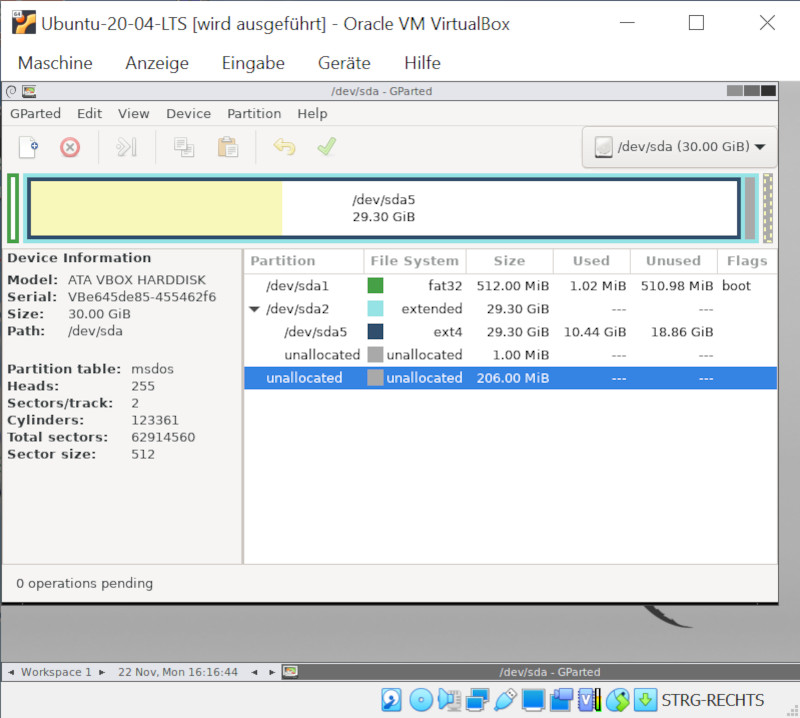 Partition Table after Partition Layout Changes
Finally reboot Ubuntu Vm and check partition size
helmut@kubemaster:~/Desktop$ lsblk -p | grep "part"
├─/dev/sda1   8:1    0  512M  0 part /boot/efi
├─/dev/sda2   8:2    0    1K  0 part
└─/dev/sda5   8:5    0 29,3G  0 part /

helmut@kubemaster:~/Desktop$ df /
Filesystem     1K-blocks    Used Available Use% Mounted on
/dev/sda5       30170060 8780004  19837724  31% /
Reference
Be First to Comment